You like your profile photo. You just don't want *everyone* seeing it. Maybe it's your new boss. Maybe it's that one relative who screenshots everything. Maybe it's a number you saved once and never spoke to again.
WhatsApp has exactly the setting for this — and it's not blocking anyone, it's not deleting anyone, and it doesn't change your photo at all. It just quietly decides who's allowed to see it.
The setting you're looking for
WhatsApp calls it My contacts except…, and it lives under Profile photo privacy. The names you select are the people you *exclude*. Everyone else in your contacts can still see your DP. If you want to hide it from literally everybody, that's a different option — Nobody.
Get clear on what you're doing before you start, because hiding a picture and changing a picture solve two different problems. You can keep the exact same DP and just change the audience. Plenty of people do the opposite by mistake — they change the photo when what they really wanted was a smaller audience.
Finding it
- Open WhatsApp Settings. On Android, it's in the three-dot menu; on iPhone, it's the app's own Settings area.
- Open Privacy, then Profile photo (or Profile picture, depending on the label your version shows).
- Choose My contacts except….
- Select the saved contacts you want to exclude, and confirm with whatever control your version shows.
- Reopen the setting and double-check the excluded names before you leave. This last step is the one that catches mistakes — especially when two contacts share a first name.
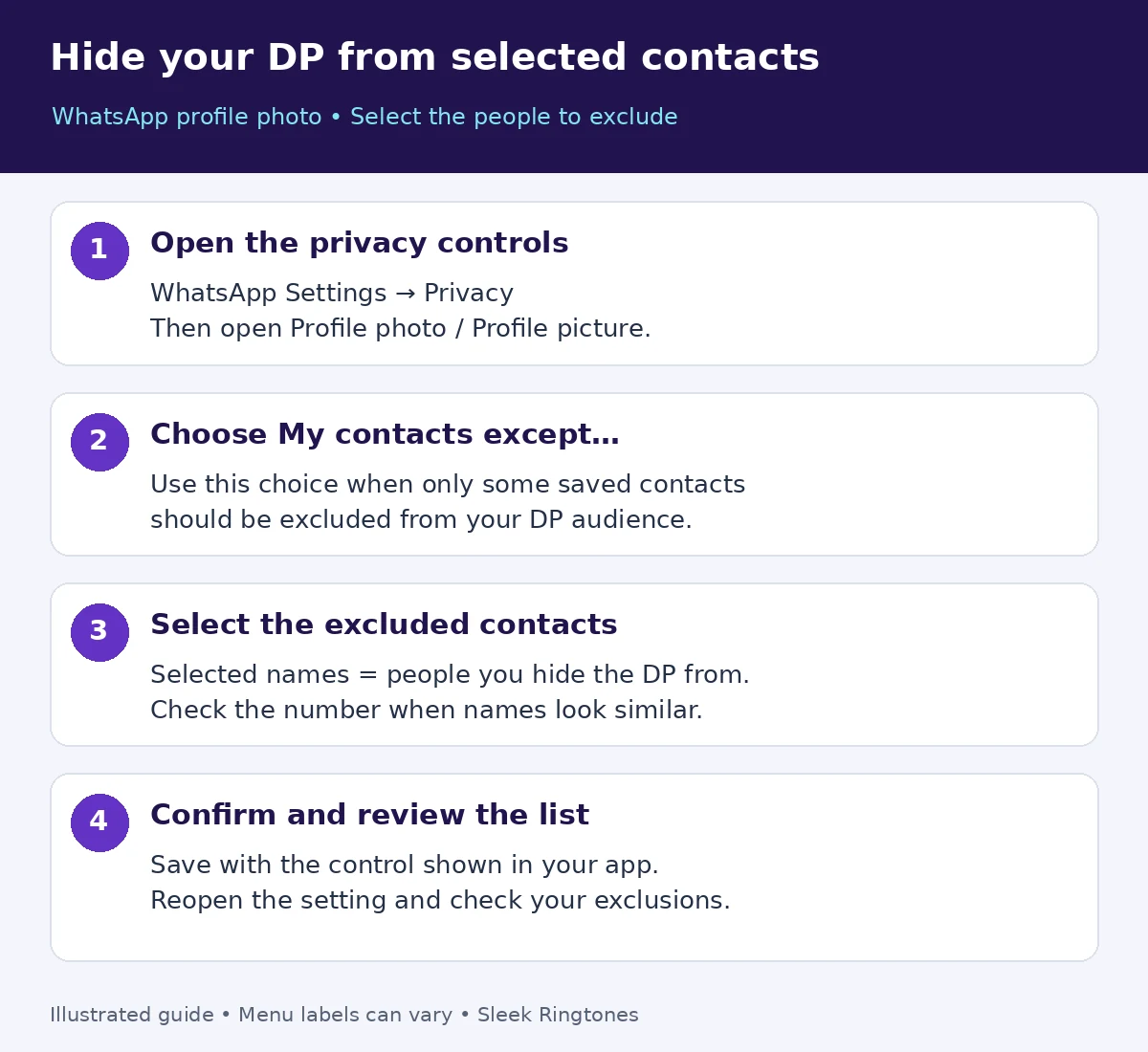
This is an illustrated guide, not a live WhatsApp screenshot. WhatsApp's profile-photo help confirms the privacy path and available audience choices.
The four audiences, in plain English
- Everyone: any WhatsApp user can see your photo. Even strangers who have your number.
- My contacts: only people saved in your address book.
- My contacts except…: saved contacts *minus* the names you exclude.
- Nobody: nobody sees it. Everyone gets the generic avatar.
Those meanings come from WhatsApp's privacy settings guide. One thing worth remembering with the exclusion option: saving *more* contacts changes who's eligible to see the picture. Every time your contact list grows — a new colleague, a delivery driver you saved — the audience shifts a little. Worth a glance at the setting whenever your contacts change noticeably.

Did you exclude the right person?
This is where the real mistakes happen, and they're almost always name mix-ups. Two "Ahmed"s. A father and son with the same name. A contact saved under a nickname.
Before you trust the setting, compare the *number* on the selected contact against the person you meant — not just the name. If you can, ask one trusted included contact and one trusted excluded contact what they currently see. Treat that as a practical check alongside the saved setting, not proof of instant refresh — changes can take a little while to show up on every device.
And if someone who *should* see your photo can't: don't panic. Review your privacy choices and contact syncing first. WhatsApp also lists temporary connection problems and blocking among the reasons profile information goes missing. A missing DP on its own doesn't tell you which explanation applies. See its profile-information troubleshooting guide.
What about people who aren't in your contacts?
One gap worth knowing: "My contacts except…" only governs saved contacts. An unsaved number — someone who messaged you once, a number you never saved — sits outside that audience entirely. So if your goal is "only people I actually know should see my photo", the exclusion list alone doesn't fully get you there; the "My contacts" base audience does most of the work, and the exclusions handle the exceptions inside it.
This is also why the setting behaves oddly in group chats. Someone in a shared group who isn't in your contacts doesn't suddenly gain DP access because they can see your messages — the photo audience and the chat audience are different things.
Three things people mix up
Does this block messages or calls from excluded contacts? No. This setting only controls who sees your profile photo. Blocking is a separate control for messages, calls, and statuses. If you want someone to stop contacting you, you need the block button — hiding your DP won't do it.
Does it also control who sees my Status? No. Profile photo and Status are separate privacy settings in WhatsApp. If you want to limit Status viewers too, go review that setting on its own. Changing your DP audience is not a full privacy review.
Can I see who viewed my profile? WhatsApp says no — there's no profile-view list. And the absence of a visible photo isn't a view report either. Anyone claiming an app can show you that is selling something WhatsApp doesn't offer.
Picking a photo that survives the little circle
If you're updating the photo as well as the audience, browse our WhatsApp DP collection, then use the DP upload and crop guide so it stays sharp. Fancy an illustrated look instead? Our anime DP ideas walk through another visual option. Photo choice and audience are two separate decisions — you can sort them in either order.